Straydog Zones & Levels settings: every input explained
Straydog Zones & Levels draws the daily DAX levels you paste into it. Everything you can change — the levels block, which elements you see, the look of the zones, lines and labels, the alert and the shift to futures prices — is in the settings window. This page explains every setting.
On this page
Part of Straydog Zones & Levels
TradingView indicator that draws the daily DAX zones and levels from Straydogtrading.com on index, CFD and futures charts.
Install Straydog →Opening the settings
Double-click the name StraydogDX at the top left of your chart (the indicator's short name; in the indicator list it is called Straydogtrading.com DAX Levels), or hover over it and click the gear icon . Everything on this page is in the Inputs tab, in this order: Help screens with the Levels field, one group per element, then General, Cash-future offset and Debug. Hover over an i to read the explanation of a setting. The Style tab holds TradingView's own display options; for a clean chart untick Inputs in status line there — see TradingView tips for a clean chart.
The levels block
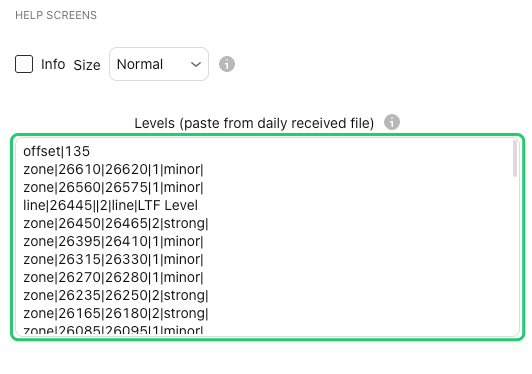
The Levels field at the top is where the day's levels go: paste the block from your Straydogtrading.com subscription and every zone and line is redrawn at once. Paste the new block every trading day. The indicator only draws what you paste — it does not make levels itself. Step by step: install and paste the daily levels.
Info shows a welcome and setup panel in the middle of the chart; Size sets its text size. Switch it off once you are set up.
Settings per element
Every element has its own group with the same building blocks. The numbers match the screenshot below.
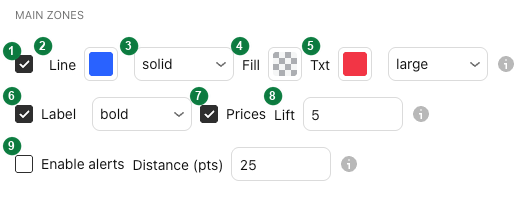
| 1 · On / off | Shows or hides the whole group. All groups are on by default. |
|---|---|
| 2 · Line | The colour of the line or of the zone's two lines. |
| 3 · Style | Solid, dashed or dotted. |
| 4 · Fill | Zones and index gaps: the colour and transparency of the band between the two lines. |
| 5 · Txt | The colour and size of the label text. |
| 6 · Label | Show or hide the label, in normal, bold or italic text. |
| 7 · Prices | Adds the price — or the price range of a zone — to the label. |
| 8 · Lift | Moves the label up (+) or down (−) from its line, in points. Default 5. |
| 9 · Alerts | Main zones only: see alerts. |
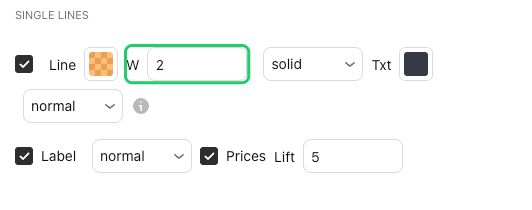
Zones have no width setting: their width comes from the levels block (2 for a zone Straydog marks as strong, otherwise 1). The groups for single prices have a width, W (1–5, circled), instead of a fill:
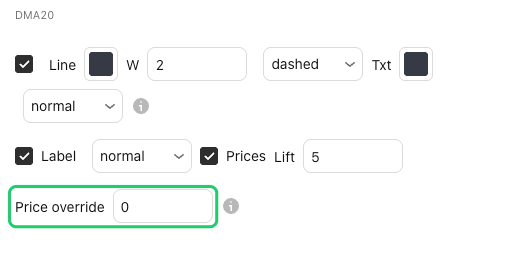
The three moving averages also have a Price override (circled): enter a price to use instead of the one in the block, or leave it at 0.
The groups, in the order of the settings window:
| DMA20, DMA50, DMA200 | The 20, 50 and 200-day averages of the DAX index — see D SMA index. |
|---|---|
| Main zones | The key zones of the day — see main zones. |
| Strong zones, Minor zones | The other zones of the day — see strong and minor zones. |
| Gap | The open gaps of the DAX index — see gap index. |
| Single lines | Single price levels — see single lines. |
| Previous close | The DAX index close of the previous session — see PsC index. |
| Futures settlement | The previous settlement price of the DAX future — see PsS future. |
| Untested closes | Earlier DAX closes the market has not traded back to — see untested close index. |
The default colour and style of every group: all Straydog elements.
Alerts
Under Main zones, tick Enable alerts and set Distance (pts): how close price must come to a zone edge (default 25 points). Then create one alert in TradingView: Alerts → Create alert → condition Straydogtrading.com DAX Levels → Any alert() function call, and choose how you want to be notified. That one alert covers all main zones and fires once per zone per day; zones reached at the same moment come in one message.
General
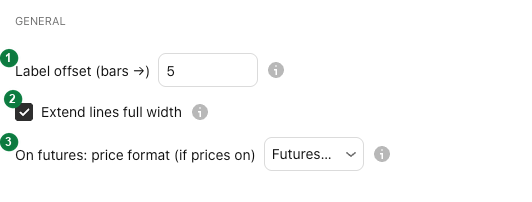
| 1 · Label offset (bars →) | How far to the right of the last candle the labels sit, in candles. Default 5. |
|---|---|
| 2 · Extend lines full width | On (default): lines run across the whole chart. Off: they stop just before their labels. |
| 3 · On futures: price format | Only on a futures chart, for groups with Prices on. Futures + Index (default) shows the futures price with the index price in brackets; Futures only leaves out the index price. |
Cash-future offset
The levels are DAX index prices. On the index and on index CFDs they are drawn as they are and this group does nothing. On a DAX future (FDAX, FDXM, FDXS) or a future CFD every level is shifted by the cash-future difference. Method chooses how:
| Straydog future offset | Default. Uses the offset from the levels block. When the real difference drifts during the day, fine-tune it with Future offset adjustment — and set that back to 0 the next day. |
|---|---|
| Automatic offset | The indicator measures the difference itself, in real time and without a paid data subscription, also before the stock market opens. Future offset adjustment is ignored. Leave the two ticker fields below it as they are; if one returns no data, a warning appears and the levels on the futures chart are hidden until it is fixed. |
Debug
Handy when a level is not where you expect it, or when you send a question.

| 1 · Show table | A table with what the indicator read from the levels block and how it placed the levels. Off by default. |
|---|---|
| 2 · Text size | The text size of the table. |
Frequently asked questions
How do I get the original settings back?
Open the settings, click Defaults at the bottom left and choose Reset settings. This also empties the Levels field, so paste the day's block again afterwards.
Do I have to paste the levels every day?
Yes. The indicator draws exactly what is in the Levels field. Paste the new block every trading day; until then the chart shows the levels of the old one.
The levels on my FDAX chart are a few points off. What now?
The offset in the levels block is measured in the morning; during the day the real difference between the DAX and the future can drift. Correct it with Future offset adjustment (and set it back to 0 the next day), or switch Method to Automatic offset. See cash-future offset.
How do I show only the futures price in the labels?
Under General, set On futures: price format to Futures only. To hide the prices of a group completely, untick its Prices box.
Why don't I get an alert?
Tick Enable alerts under Main zones and create the alert in TradingView itself: Alerts → Create alert → condition Straydogtrading.com DAX Levels → Any alert() function call. Alerts are only for the main zones.
Set Straydog Zones & Levels up your way
Install the indicator, paste today's levels block and adjust the look to your chart. The daily levels come with your Straydogtrading.com subscription.