Period 1 and Period 2: two windows where the market often turns
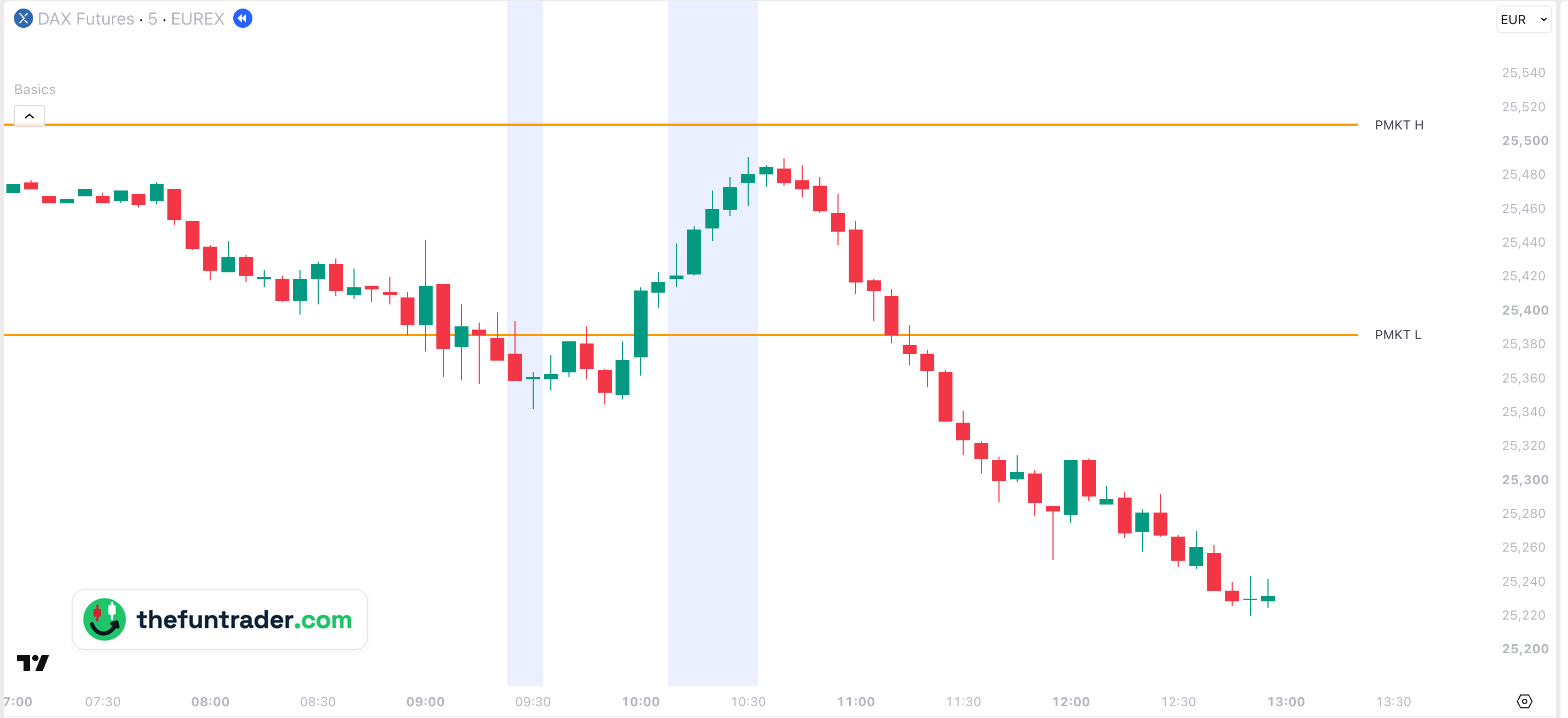
Period 1 and Period 2 are two short time windows shortly after the stock market opens, shaded on your chart. In those minutes the market often turns: a move that started at the open runs out, or a test of a level fails and reverses. Basics sets the times automatically for each market and shades them on every supported chart — futures, CFDs and the index. This page shows what that looks like and how to use it.
On this page
 09:00 · Xetra opens
123
09:00 · Xetra opens
123

- 1Period 1 — FDAX dips 44 points under the pre-market low (25,386) to the low of the morning: 25,342. The break fails: by 10:00 FDAX is back above PMKT L.
- 2Period 2 — the rally runs out at 25,491, 149 points above the low and 19 points under the pre-market high (25,510).
- 312:50 — 271 points lower: 25,220. The turn in Period 2 started the fall of the day.
Part of Basics
Free TradingView indicator with all session, week and month levels for index, futures and CFD charts.
Install Basics (free) →What the two periods mark
The first hour after the stock market opens is the busiest of the day. Orders from the open are worked off, the first moves run their course, and at some point many of them stop. Experience shows that this often happens in two short windows: Period 1 and Period 2. Basics shades them in light blue, at the right moment for each market — the US markets and the European ones each have their own windows.
A period is not a signal on its own. It says when a turn is more likely; a level says where. The strongest moments are the ones where both come together — as in the example above, where the turns came at the pre-market low and just under the pre-market high.
How to use them
- Watch the levels during a period. Price testing a level such as PMKT H or PMKT L inside a period, and failing to break it, is a classic reversal setup.
- A failed break counts too. In both examples on this page price briefly broke the pre-market low inside Period 1 and turned — the break was the trap.
- No turn is information as well. When a move runs straight through a period, it often has the strength to continue.
How Basics shows them
The periods are clock times, so they appear at the same moment on every supported chart: futures (main, mini, micro, nano), CFDs and the index itself.
| Default look | Light blue background, transparency 90 |
|---|---|
| Switched on by default | Yes, both |
| Times | Shortly after the stock market opens, set automatically for each market |
| Charts | Futures, CFDs and the index — the same clock times on every chart type |
| Timeframes | Intraday charts from 1 minute, on seconds charts too, unless the level needs more history than the chart loads; not on daily or higher charts |
| Markets | Nasdaq-100, S&P 500, Dow, Russell 2000, DAX, FTSE 100 and AEX — all tickers |
The same pattern on ES
Click the chart to enlarge it.

Why don't I see the periods?
- They are switched off.Check Period 1 and Period 2 under Backgrounds in the indicator settings.
- You are on a daily or higher chart.The periods are drawn on intraday charts only.
- The background is too light for your screen.Lower the transparency next to the checkbox — 0 is solid, 99 almost invisible.
- Your ticker is not recognised.See the supported tickers — and if yours is missing, let me know: requests are very welcome.
What you can change
In the indicator settings (the gear icon next to Basics on your chart), under Backgrounds:
| Show / hide | Period 1 and Period 2 checkboxes · Backgrounds |
|---|---|
| Colour | Any colour, per period |
| Transparency | 0–99 (default 90; higher is lighter) |
| Times | Set automatically for each market; they cannot be changed |

Charts and defaults on this page: Basics v11.72.8 · updated 21 October 2026.
Frequently asked questions
At what times are the periods?
Shortly after the stock market opens, set automatically for each market — the exact windows are part of the indicator. They are on by default, so you see them as shaded areas on your chart.
Should I trade every turn in a period?
No. The periods say when a turn is more likely, the levels say where. A turn at a level, inside a period, is the combination to look for.
Can I change the times?
No. You can change the colour and the transparency, and switch each period on or off.
Do they work on a CFD or an index chart?
Yes. The periods are clock times, so they appear at the same moment on every supported chart.
Why don't I see them on the daily chart?
They mark a few minutes of the day; on a daily or higher chart there is nothing to shade.
Related levels
See the periods on your own chart
Basics is free on TradingView. Add it to any supported chart — for example FDAX or MES — and the periods are shaded from the start.