Cw 50% / Cw 61.8% index: the levels inside this week's index range
Cw 50% and Cw 61.8% index are two levels inside this week's range of the index — for example the Dow or the DAX — during regular trading hours: the middle of the range, and the 61.8 % retracement of the week's move. When price pulls back after a strong move, these are two of the places where it often turns. The lines move with every new high or low of the week. Basics draws them on the index and CFDs as they are, and converts them to the right price on futures charts. They are switched off by default; this page explains what they show and how to switch them on.
On this page
 1234
1234

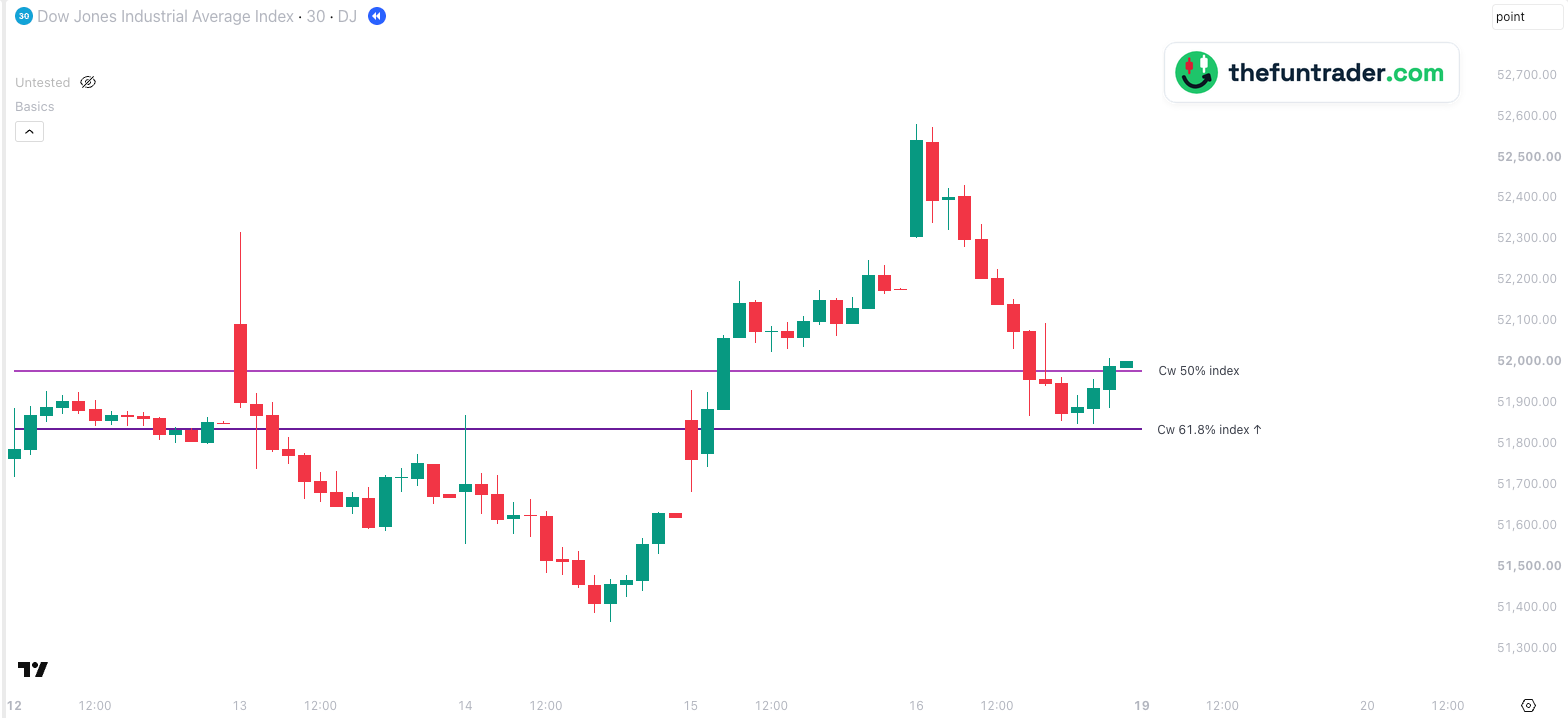
- 1Wednesday 14 October, 14:00 — the low of the week.
- 2Friday 16 October, 09:30 — the high of the week. The high came after the low, so Cw 61.8% ↑ is measured down from the high: 51,835.08; Cw 50% is 51,978.70.
- 314:30 — after a fall of more than 700 points the Dow stops at 51,847.94, 13 points above Cw 61.8%.
- 416:00 — the week ends at 52,002.41, the official close, just above Cw 50%.
Part of Basics
Free TradingView indicator with all session, week and month levels for index, futures and CFD charts.
Install Basics (free) →What the two lines show
Every week the index builds a range during regular trading hours: from its lowest to its highest price since the week's first opening. Basics draws two levels inside it:
- Cw 50% index — the middle of the range, halfway between the week's high and low.
- Cw 61.8% index — the 61.8 % retracement of the week's move: how far price has come back from the latest extreme. 61.8 % is the best-known Fibonacci ratio, and many traders watch it as the level where a pullback should hold if the move is to continue.
The range only grows during the week, so the lines move with it: a new high or a new low shifts both. Early in the week the range is small and the levels mean little — that is why Basics only shows them once the range is at least 1 % of the price (adjustable).
Which way the 61.8 % is measured
The label shows an arrow:
| Cw 61.8% index ↑ | The week's high came after its low — the week moved up. The level lies below the high: the high minus 61.8 % of the range. |
|---|---|
| Cw 61.8% index ↓ | The week's low came after its high — the week moved down. The level lies above the low: the low plus 61.8 % of the range. |
Index range or futures range?
The futures version, Cw 50% / Cw 61.8% future, uses the main future's range, night and pre-market included. The index version only uses the hours the stock market is open. When a big move happens overnight the two ranges differ, and so do the levels.
Why traders watch them
- Where a pullback can stop. After a strong move, the 50 % and 61.8 % levels of that move are classic places for a pullback to end — as on Friday in the example.
- The middle of the week. Above Cw 50% the week is in its upper half, below it in its lower half; price often pauses there.
- Not a wall. When price closes well beyond the 61.8 % level, the pullback has become more than a pullback; the week's move is in question.
How Basics shows them
Both lines appear on every supported chart: on the index and on CFDs as they are, on futures (main, mini, micro, nano) converted with the current cash-future difference. They start at the week's first official opening, like CwO index.
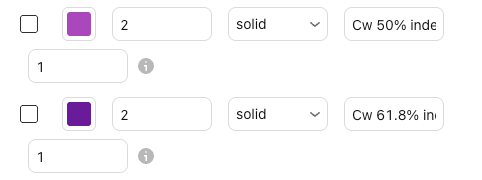
| Default look | Purple (50 %) and dark purple (61.8 %), solid, width 2 |
|---|---|
| Labels on the chart | Cw 50% index and Cw 61.8% index with ↑ or ↓ (renamable) |
| Switched on by default | No |
| Value | The middle and the 61.8 % retracement of the index's range this week, regular trading hours only |
| Shown from | A week's range of at least 1 % of the price (adjustable; 0 = always) |
| Price on your chart | Futures (main, mini, micro, nano): converted with the current cash-future difference. CFD and index charts: the index value itself |
| Where the lines start | At the candle that contains the week's first official opening; they move with the range |
| Timeframes | Charts from 1 minute up to the daily chart, on seconds charts too, unless the level needs more history than the chart loads; not on weekly or monthly charts |
| Markets | Nasdaq-100, S&P 500, Dow, Russell 2000, DAX, FTSE 100 and AEX — all tickers |
| Lookback | 1 — this week only (up to 20 weeks) |
The same lines on a CFD
Click the chart to enlarge it.

Why don't I see the lines?
- They are switched off.Both lines are off by default. Check the boxes under Index levels and the master switch Show all objects in 'Index levels' group in the indicator settings.
- The week's range is still small.The lines appear once the range is at least 1 % of the price. You can change this under General → Week range lines — minimum range; 0 shows them always.
- You are on a timeframe without them.The lines are drawn on charts from 1 minute up to the daily chart.
- Price is far away from them.Lines are hidden while the level is more than 5 % from the current price, so they don't squeeze the chart. You can change this under General → Level visibility range.
- Your ticker is not recognised.See the supported tickers — and if yours is missing, let me know: requests are very welcome.
What you can change
In the indicator settings (the gear icon next to Basics on your chart), under Index levels:
| Show / hide | Cw 50% index and Cw 61.8% index checkboxes · Index levels |
|---|---|
| Colour, width, style | Any colour · width 1–5 · solid, dashed or dotted — per line |
| Label text | Default Cw 50% index and Cw 61.8% index {direction}; {direction} becomes the arrow |
| Lookback | 1–20 weeks (default 1: this week only) |
| Minimum range | Default 1 % of the price; 0 = always · General → Week range lines — minimum range |
| Label size, line end, visibility range | Shared with all lines · General |
Charts and defaults on this page: Basics v11.72.8 · updated 21 October 2026.
Frequently asked questions
What does the arrow in Cw 61.8% mean?
↑: the week's high came after its low, so the level is measured down from the high. ↓: the low came after the high, so it is measured up from the low.
Why do the lines move?
They are calculated from this week's high and low. A new high or a new low changes the range, and both lines move with it.
What is the difference with the future version?
The index version only uses the hours the stock market is open; the future version also counts the night and the pre-market. See index range or futures range.
Why don't I see the lines on Monday?
They appear once the week's range is at least 1 % of the price. Set Week range lines — minimum range under General to 0 to always show them.
Does it work on a futures chart?
Yes. On YM, ES or FDAX the index levels are converted with the current cash-future difference.
Related levels
See this week's index range levels on your own chart
Basics is free on TradingView. Add it to any supported chart — for example the Dow, YM or US30 — and switch on Cw 50% and Cw 61.8% index under Index levels.