Main zones: the key DAX zones of the day
Every trading day Straydogtrading.com publishes the DAX levels for the day. The few that matter most are the main zones: the resistance above (R1 and R2, or one Main R) and the support below (S1 and S2, or one Main S) where a reaction is most likely. Straydog Zones & Levels draws each of them as a shaded band between two lines, with a bold label — on the DAX index, a DAX CFD or a DAX future.
On this page
 12345
12345

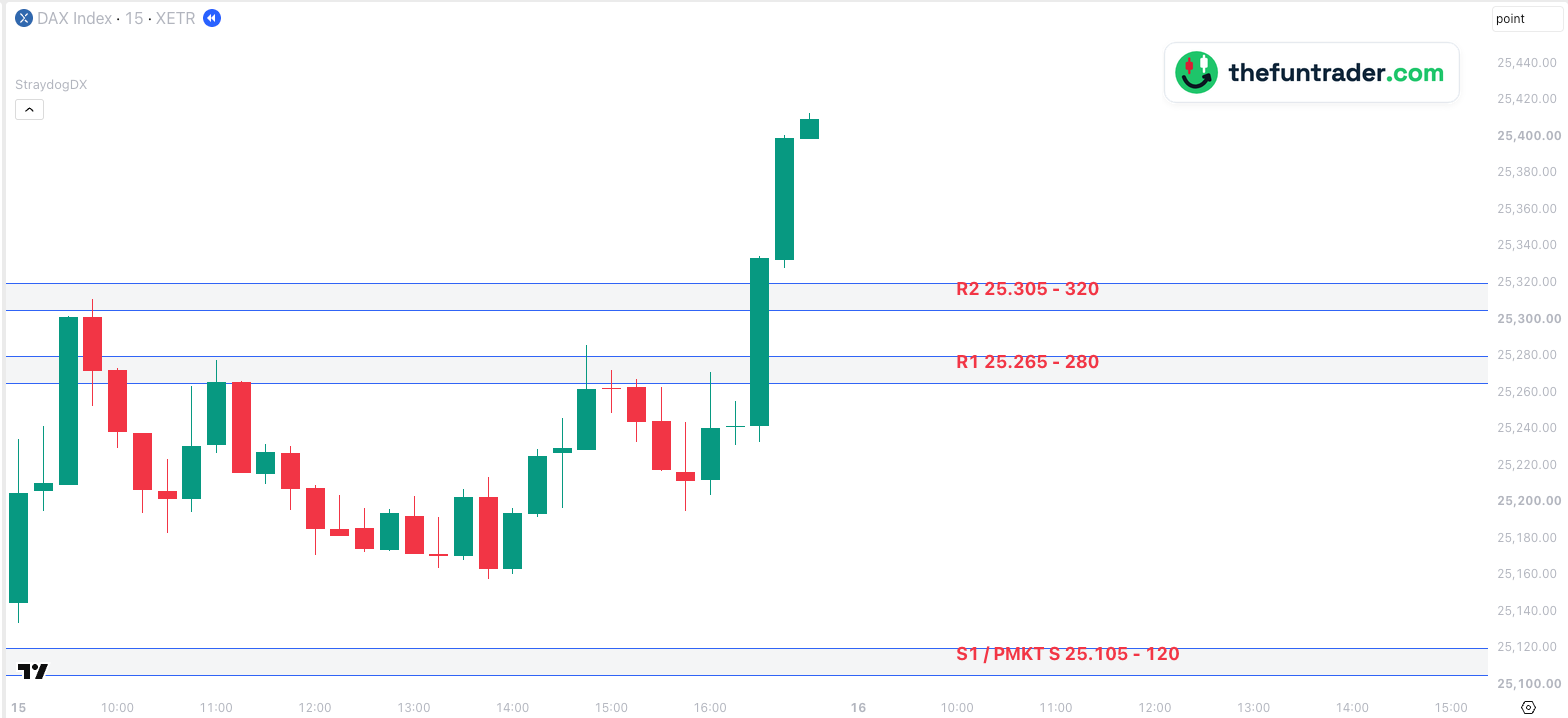
- 109:00 — the DAX opens at 25,145.07, 25 points above S1. The first low, 25,133.71, stays 14 points above the zone and price goes up.
- 209:45 — up to 25,310.91, 6 points into R2. There it turns: by 10:30 the DAX is 128 points lower.
- 311:00 — back at R1: 25,277.45, inside the zone, and down again to 25,157.81 at 13:45.
- 414:45 — 25,286.04, 6 points above R1, but the candle closes back inside it. At 16:00 R1 holds once more.
- 516:30 — one candle through R1 and R2. Both zones are behind price; at 17:00 the DAX is at 25,413.22, 93 points above R2.
Part of Straydog Zones & Levels
TradingView indicator that draws the daily DAX zones and levels from Straydogtrading.com on index, CFD and futures charts.
Install Straydog →What a main zone is
A support or resistance level is rarely one exact price. Buyers and sellers react somewhere around it, so a zone — a band of usually 10 to 20 points — describes it better than a line. The levels block of Straydogtrading.com lists many zones every day; the main zones are the ones Straydog names:
| R1, R2 | Resistance above the price: the first and second zone where a rise is most likely to stall |
|---|---|
| S1, S2 | Support below the price: the first and second zone where a fall is most likely to stop |
| Main R, Main S | On some days there is one main resistance and one main support instead of numbered zones |
A label can say more: S1 / PMKT S on 15 October means the zone was also the support of the pre-market. Every other zone in the block is drawn as a strong or minor zone.
How traders use them
- A plan before the open. With four zones on the chart you know where you expect a reaction — and where you don't need to look.
- Wait for the reaction. A zone is a place to watch, not an order: a clear rejection or a confirmed break at the zone is the signal, as at R2 and R1 in the example.
- A broken zone is not gone. When price breaks through and stays on the other side, the zone often works the other way round on the way back.
For the method behind the zones, go to the source: Straydogtrading.com.
How Straydog Zones & Levels shows them
You paste the day's levels block into the indicator settings; every main zone in it is drawn at once, across the whole chart, with its name and prices on the right. The prices are DAX index prices. On the DAX index and on index CFDs such as GER40 they are drawn as they are; on a DAX future (FDAX, FDXM, FDXS) or a future CFD every zone is shifted to the futures price with the offset from the levels block.
| Default look | Blue lines, solid, with a light grey band between them |
|---|---|
| Line width | From the levels block: 1, or 2 for a zone Straydog marks as strong |
| Label on the chart | The zone's name and prices, for example R1 25.265 - 280, in large bold text |
| Switched on by default | Yes |
| Price on your chart | DAX index and index CFDs: the price from the block · DAX futures and future CFDs: shifted with the offset |
| Alert | Optional: one alert for all main zones, once per zone per day when price comes within a set distance |
| Markets | DAX only — see the supported tickers |
An alert when price comes near a main zone
Switch on Enable alerts under Main zones and set the distance in points (default 25). Then create one alert in TradingView: Alerts → Create alert → condition Straydogtrading.com DAX Levels → Any alert() function call. It covers all main zones and fires once per zone per day, when price comes within that distance of a zone edge; zones reached at the same moment come in one message.
Why don't I see the zones?
- No levels block pasted, or an old one.The zones come from the block you paste in the settings. Paste the block of today; see install and paste the daily levels.
- The group is switched off.Check the first box under Main zones in the indicator settings.
- Your chart is not a DAX chart.The levels are DAX levels; on any other ticker the indicator stays empty. See the supported tickers.
- The zone is outside the visible prices.Scroll or zoom out the price scale: S2 or R2 can be far from the current price.
What you can change
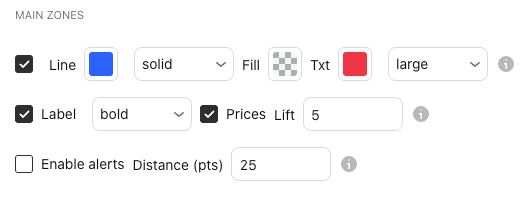
In the indicator settings (the gear icon next to Straydogtrading.com DAX Levels on your chart), under Main zones:
| Show / hide | First checkbox · Main zones |
|---|---|
| Line colour and style | Any colour · solid, dashed or dotted (the width comes from the levels block) |
| Fill | The colour and transparency of the band between the lines |
| Label | Text colour and size · show or hide · normal, bold or italic · with or without prices · Lift: points above (+) or below (−) the line |
| Alerts | Enable alerts and Distance (pts), default 25 |
| Label position, line length | Shared with all groups · General: label offset in bars, lines full width or up to the label |
Charts and defaults on this page: Straydog Zones & Levels v2.51.2 · updated 21 October 2026.
Frequently asked questions
Where do the main zones come from?
From the daily levels of Straydogtrading.com. The indicator does not calculate them: you paste the day's levels block, and the zones Straydog names R1, R2, S1, S2, Main R or Main S are drawn as main zones.
Why is a main zone sometimes drawn thicker?
The width comes from the levels block. A zone Straydog marks as strong gets width 2, the others width 1 — whatever group it is in.
Do the zones work on FDAX?
Yes. The prices are DAX index prices; on FDAX, FDXM, FDXS and the DE40FU CFD every zone is shifted with the offset from the levels block. Fine-tune it with Future offset adjustment.
Can I get an alert when price comes near a zone?
Yes, for the main zones. See the alert: one TradingView alert covers all of them.
Do I need a subscription?
Yes. The indicator only draws the levels; the daily levels block comes with your Straydogtrading.com subscription.
Related levels
See the main zones on your own DAX chart
Install Straydog Zones & Levels, paste today's levels block and the main zones appear — on the DAX index, a CFD or the future. The daily levels come with your Straydogtrading.com subscription.